
close
Choose Your Site
Global
Social Media
Views: 0 Author: Site Editor Publish Time: 2025-10-21 Origin: Site
Ever wondered how fiber networks stay strong? Fusion Splicer makes seamless connections possible. It reduces signal loss and strengthens joints. In this guide, you will learn step-by-step splicing, covering preparation, operation, and proper maintenance.
A Fusion Splicer is a precision tool designed to join two fiber optic cables by aligning their cores and fusing them using heat. Core components include an alignment mechanism, heat source, and a fiber cleaver. They minimize signal loss and enhance connection strength. These splicers vary in function, from single-fiber splicers to portable and ribbon splicers.
The device ensures fibers are precisely aligned and melted together, producing strong, low-loss splices. Understanding its parts and functions helps operators achieve higher efficiency during installations.
Fusion splicing significantly reduces signal attenuation and back reflection. Properly aligned fibers maintain high transmission quality over time. The fused joint also provides mechanical strength, which increases durability under stress, temperature fluctuations, and vibrations.
By improving reliability, fusion splicing lowers maintenance costs and enhances overall network performance. Networks using properly spliced fibers experience fewer outages and stronger data integrity.
Core alignment aligns the actual fiber cores, providing the lowest possible splice loss. Cladding alignment joins fibers based on their outer cladding, which is simpler but results in higher signal loss. Core alignment is preferred for single-mode fibers, while cladding alignment may be sufficient for multimode fibers or short-distance links.
Fusion splicers come in different types:
● Single-fiber splicers: Ideal for point-to-point connections or repairs.
● Ribbon splicers: Allow multiple fibers to be fused simultaneously, saving time in high-volume installations.
● Portable splicers: Lightweight and compact, suited for field operations and emergency repairs.
Each type has pros and cons regarding portability, speed, and splice quality. Selection depends on the project scope and operational requirements.
To perform fusion splicing effectively, gather all necessary tools: fiber optic cleaver, strippers, alcohol wipes, heat shrink tubes, and the fusion splicer itself. Always follow safety protocols to prevent injuries from glass fibers. Ensuring a clean, organized workspace and having all tools prepared before starting minimizes errors and improves splice quality. Proper preparation saves time, reduces splice loss, and enhances network reliability.
Properly strip and clean fiber coatings to avoid contamination. Dust, oil, or moisture on fiber ends can cause high splice loss. Cleaning should be thorough, and fibers should appear clean and shiny before proceeding. Use lint-free alcohol wipes and avoid touching cleaned fiber ends. Proper preparation significantly reduces splice loss and ensures strong, long-lasting fiber connections.
Use a precision fiber cleaver to cut fibers at a perfect 90° angle. Proper cleaving ensures accurate alignment and minimal loss during fusion. Misaligned or angled cuts can increase splice loss and compromise signal quality. Inspect the cleaved ends under a microscope and re-cleave any imperfect cuts to maintain consistency.
Prepare heat shrink tubes before splicing. They protect fiber joints after fusion by providing mechanical support and shielding against environmental damage. Ensure even placement to avoid uneven heating or weak points. After fusion, slide the tube over the splice point and apply heat evenly. Proper heating strengthens the joint and prevents environmental damage, while avoiding bubbles or uneven shrinking.
Place the stripped and cleaved fibers into the V-grooves of the splicer. Use the pressure plate to secure them without causing damage. Proper insertion prevents misalignment and ensures the splicing process proceeds smoothly. Verify that the fibers are correctly positioned visually before alignment.
Most modern splicers offer automatic core alignment. If necessary, manual adjustment can fine-tune the fiber positioning. Correct alignment minimizes splice loss and ensures long-term performance. Repeat alignment verification using splicer diagnostics to prevent errors. Proper alignment improves splice durability and reduces the need for future maintenance.
Activate the fusion arc and monitor the process on the splicer’s display. The machine calculates estimated loss and displays indicators for a successful splice. If loss is above the acceptable threshold, repeat the process to achieve optimal results. Avoid touching fiber ends or splicer components to maintain a contamination-free environment.
Use built-in diagnostics or external OTDR testing to verify splice quality. Record the loss and ensure it is within acceptable limits. Poor splices should be redone to maintain network integrity. Consistent quality checks prevent future connectivity issues and reduce downtime.
Step | Task | Key Points |
1 | Strip Fiber | Remove jacket and coating carefully |
2 | Clean Fiber | Use alcohol wipes until fibers are squeaky clean |
3 | Cleave Fiber | Cut at 90° for minimal splice loss |
4 | Insert Fiber | Place in V-groove and secure with pressure plate |
5 | Splice | Activate fusion arc, monitor display |
6 | Heat Shrink | Apply heat evenly to protect joint |
7 | Coil & Store | Organize fibers to prevent stress |
After fusion, slide the heat shrink tube over the splice point and apply heat evenly. Proper heating not only strengthens the joint but also protects it from moisture, dust, and physical stress. Avoid bubbles or uneven heating, which can compromise mechanical integrity and signal quality. Consistent and careful application ensures long-term durability and maintains the optical performance of the spliced fiber. Properly applied heat shrink safeguards the splice from environmental factors, reducing the likelihood of failures during network operation.
Coil fibers neatly and secure them in trays or splice boxes to prevent accidental bending or stress. Sharp bends or improper handling can damage the spliced joints and lead to signal loss or fiber breakage. Organized storage simplifies maintenance, troubleshooting, and future expansions. Using protective trays or splice enclosures ensures fibers remain tension-free, and proper coiling maintains alignment integrity, reducing operational risks and prolonging the life of the spliced network components.
Visually inspect the splice for alignment, smoothness, and integrity. Optionally, use OTDR testing to confirm the optical signal quality and ensure splice loss is within acceptable limits. Detecting and correcting defects at this stage prevents network downtime and costly rework later. A thorough final inspection not only guarantees performance but also reinforces operational standards for consistency. Any anomalies should be addressed immediately before network deployment to ensure reliable and uninterrupted connectivity.
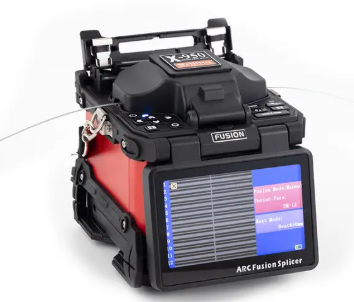
Routine cleaning of the electrodes and regular calibration of the splicer is critical for consistent, low-loss splicing. Dirty or worn electrodes can cause irregular arcs, leading to higher splice loss and reduced reliability. Follow manufacturer-recommended schedules for cleaning and calibration to extend the splicer’s operational life. Neglecting maintenance can result in frequent splice failures, increased operational costs, and inconsistent results, making adherence to proper procedures essential for long-term network performance.
Debris or dust in V-grooves or lenses affects fiber alignment and can significantly reduce splice quality. Regular inspection and cleaning are crucial to maintain high-performance splicing. Replace worn or damaged components promptly to prevent alignment errors and ensure repeatable low-loss results. Maintaining clean optical paths within the splicer ensures each fiber is accurately positioned, which is vital for both single-fiber and ribbon splicing operations.
Keep the splicer firmware updated to access the latest features, bug fixes, and performance improvements. Adjust settings like arc duration, alignment sensitivity, and fiber type configuration for optimal results. Properly configured splicer software enhances efficiency, improves splice quality, and reduces the risk of errors. Routine updates and careful optimization enable operators to achieve consistent, low-loss splices across multiple projects and fiber types.
High splice loss is typically caused by contaminated fibers, poor cleaving, or misalignment. Clean fibers thoroughly, recleave as needed, and verify splicer settings to minimize loss. Document recurring problems for operator training and process refinement. Understanding the root cause of high-loss splices helps prevent repeated errors, improves network reliability, and ensures every splice meets quality standards.
Misaligned fibers reduce signal transmission and can result in long-term reliability issues. Alignment problems can be detected visually or using splicer diagnostics. Reposition fibers carefully and perform test splices to confirm proper alignment. Maintaining accurate alignment ensures minimal insertion loss and extends the life of the fiber network. Consistent monitoring and correction of alignment errors are key to high-quality splicing operations.
Dust, oil, or humidity can degrade splice quality, especially in field environments. Maintain a clean workspace, use protective covers, and implement portable clean benches when necessary. Environmental factors like temperature and vibration also influence splicing performance. Proactively managing contaminants and environmental challenges reduces the likelihood of splice failure and ensures reliable network deployment in both indoor and outdoor settings.
Consistent maintenance, proper fiber handling, and standardized splicing procedures prevent common errors and improve overall efficiency. Document best practices for training to ensure uniform quality across operators. Preventive strategies reduce downtime, minimize repair costs, and maintain network integrity. Establishing a culture of meticulous fiber handling and proactive maintenance ensures every splice meets high-quality standards.
Efficiency should never come at the cost of quality. Rushing fiber preparation, alignment, or splicing can lead to mistakes, high splice loss, and costly rework. A balance between speed and precision ensures high throughput without compromising optical performance. Careful attention to each splicing step maintains consistency, reduces errors, and improves operator confidence, resulting in reliable and durable fiber networks.
Ribbon splicers allow multiple fibers to be fused simultaneously, increasing productivity for large-scale projects. Verify each fiber within the ribbon batch to ensure low-loss results. Batch splicing saves time, reduces labor costs, and ensures uniform quality. Proper ribbon handling and alignment are essential to prevent cumulative loss or mechanical stress that could affect network reliability.
Portable splicers require adjustments for temperature, vibration, and lighting conditions when deployed in the field. Laboratory environments provide stable conditions, allowing higher throughput and precision. Adapting splicing procedures to environmental conditions ensures consistent performance, reduces errors, and allows operators to achieve high-quality splices regardless of the setting.
Overlooking fiber cleaning, improper cleaving, or incorrect heat shrink placement reduces splice efficiency and quality. Train operators to follow precise step-by-step protocols, perform regular quality checks, and document deviations for corrective action. Proper training and adherence to standardized procedures increase both efficiency and network reliability, reducing downtime and maintenance costs while ensuring consistent, low-loss splicing outcomes.
Mastering a Fusion Splicer ensures strong, low-loss fiber connections. Following step-by-step guidance from Shinho Optics Limited. improves network reliability and reduces errors. Their splicers offer precision, durability, and easy maintenance, delivering high-performance, cost-efficient fiber optic solutions.
A: A Fusion Splicer is a precision tool that joins two fiber optic cables by aligning their cores and fusing them with heat. It ensures low splice loss and strong mechanical joints. For beginners, a Fusion splicer step-by-step tutorial helps understand its operation.
A: To use a Fusion Splicer, prepare and clean the fibers, cleave them at 90°, insert into the splicer, and follow the alignment and fusion steps. Learning How to operate a fusion splicer ensures accurate and low-loss splices.
A: Fiber optic fusion splicing steps include stripping and cleaning fibers, cleaving ends, inserting fibers into the splicer, performing the fusion arc, and applying heat shrink protection. Following each step reduces errors and improves performance.
A: Cleaning fibers removes dust, oil, and moisture that can cause high splice loss. Proper cleaning ensures a reliable Fusion Splicer connection. Fusion splicer maintenance tips also emphasize keeping V-grooves and electrodes clean.
A: Use the splicer’s diagnostics or OTDR testing to measure loss. A proper Fusion Splicer operation shows low splice loss and good alignment. Following a Fusion splicer step-by-step tutorial ensures consistent results.
A: Fusion splicer maintenance tips include cleaning electrodes, inspecting V-grooves, and updating firmware. Regular upkeep ensures accurate alignment, low-loss splices, and longer splicer life.
A: A Fusion Splicer reduces signal loss and provides strong mechanical joints. Proper fiber optic fusion splicing steps maintain high data transmission quality and network reliability.
A: Yes, portable Fusion Splicers are designed for field use. Adjustments for temperature, vibration, and lighting ensure stable splicing. How to operate a fusion splicer in different environments is covered in detailed tutorials.
A: Prices vary depending on type and features. Single-fiber splicers are more affordable, while ribbon or advanced models cost more. Investing in quality ensures precise fiber optic fusion splicing steps and long-term reliability.
A: High splice loss, misalignment, or contamination are common problems. Following Fiber optic fusion splicing steps carefully and applying Fusion splicer maintenance tips helps prevent these issues.


